Get Cozy Printable Stickers Pack: The Smart Way to Relax and Create
There is a specific kind of joy that comes from taking a break, brewing a cup of tea, and curling up with a favorite novel. That feeling of comfort is exactly what the Get Cozy Printable Stickers Pack aims to capture and extend into your daily creative life. Whether you are an experienced scrapbooker or someone who has never held a pair of scissors for a craft project, this collection offers a simple, accessible way to add warmth and personality to your routine.
However, while the concept of printing stickers at home sounds effortless, many creators rush into the process without understanding the nuances of file formats, paper types, and design specifications. This often leads to frustration, wasted materials, and results that don't look as professional as expected. Before you download and print, it is essential to understand how to maximize the value of this pack and avoid common pitfalls that can ruin the aesthetic of your projects.
Understanding What You Are Getting
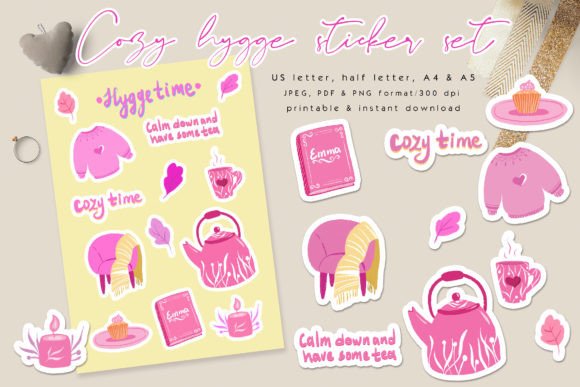
The Get Cozy Printable Stickers Pack is not just a single image; it is a comprehensive toolkit designed for versatility. It includes 14 individual PNG files featuring transparent backgrounds with white offset borders, perfect for hand-cutting. But the true value lies in the variety of sheet formats provided. You receive four JPG sticker sheets and four PDF sticker sheets, all available in A4, A5, US Letter, and Half Letter sizes. Additionally, there are four PNG sticker sheets with transparent backgrounds for more advanced editing.
Why does this matter? Many users make the mistake of assuming a "sticker pack" contains only one or two images. If you buy a product expecting a single sheet but need to fill a whole planner page, you will end up wasting money on multiple downloads. This pack solves that problem by offering multiple layout options. The 300 DPI resolution ensures that whether you are printing a small tag for a gift or a large sheet for a journal, the text and graphics remain crisp and clear.
Common Mistakes When Using Printable Stickers
Even with high-quality files like these, the final result depends heavily on how you handle the digital assets. One of the most frequent errors involves ignoring the difference between JPG and PNG formats. Users often try to use the JPG versions for projects requiring transparency, such as layering over photos in Canva or Photoshop. Because JPGs have solid white backgrounds by default, they will obscure whatever is underneath them unless you manually remove the background—a tedious and often imperfect process.
Tip: Always check the file extension before opening. Use the PNG files with transparent backgrounds when you plan to place stickers on top of other elements or print on colored paper where you want the edges to blend naturally. Save the JPG and PDF sheets for standard printing on white sticker paper where the white border is part of the intended design.
Another significant oversight is failing to account for the "offset border." These stickers are designed with a white outline to make hand-cutting easier and to give them a finished look. If you attempt to resize these images significantly in graphic software without adjusting the canvas size, you might accidentally crop off that crucial border or stretch the image, making the text blurry. This is particularly problematic if you are using free online editors that do not maintain aspect ratios well.
Choosing the Right Format for Your Project
Selecting the correct file type for your specific goal is the second step to avoiding disappointment. For instance, if you intend to use these stickers for apparel or tote bags, the standard sticker sheets won't work directly. You need the individual PNG files with transparent backgrounds. However, simply dropping a PNG onto a t-shirt design in Photoshop isn't enough; you must ensure the color mode is set correctly. Most home printers and even some professional services require CMYK color profiles, while screen designs are typically RGB. If you ignore this, the colors on your final product may appear dull or shifted compared to what you see on your monitor.
The pack mentions that colors may vary slightly due to different color monitors. This is a technical reality, not a defect. To mitigate this, always print a test page on regular printer paper first. Hold it up against your desired surface or lighting condition. This simple step prevents you from ruining expensive sticker paper or fabric with a full batch of miscolored prints.
Practical Applications Beyond Planners
While the marketing for the Get Cozy Printable Stickers Pack highlights planners and journals, the utility extends much further. Small business owners often overlook the cost-effectiveness of printable assets for branding. Instead of ordering expensive custom labels from a third-party vendor, you can use the PDF sticker sheets to create professional packaging for your handmade goods. The white offset border gives a clean, boutique feel that elevates the perceived value of your products.
Freelancers and marketers can also leverage these files for client gifts. Imagine sending a client a laptop decorated with these cozy-themed stickers alongside a personalized note. It creates a memorable, human connection that generic corporate swag fails to achieve. Educators might find the A5 and Half Letter sizes perfect for creating classroom rewards or decorating student portfolios without needing a commercial printer.
Ensuring Compatibility and Ease of Use
One area where beginners often stumble is software compatibility. The pack states that the Warm Notes PNG works on most graphic software, including Adobe Photoshop, Illustrator, and online editors like Canva. While true, users sometimes assume "compatible" means "automatic." You still need to know how to import the file. In Canva, for example, you must upload the PNG to your uploads tab before dragging it into your design. If you try to search for it within the app's stock library, you won't find it because it is a custom asset.
Furthermore, when preparing for print, ensure your printer settings are set to "Actual Size" or "100% scale." Many people unknowingly select "Fit to Page," which shrinks the sticker sheet to accommodate margins, resulting in stickers that are too small to be functional. The included dimensions (A4, A5, etc.) are precise; changing the scale ruins the proportion and makes the white border inconsistent around the images.
Final Thoughts on Making the Right Choice
The Get Cozy Printable Stickers Pack is a versatile tool that bridges the gap between digital convenience and tactile creativity. By understanding the differences between the file formats, respecting the design boundaries like the offset borders, and testing your colors before committing to expensive materials, you can ensure a satisfying experience. Avoid the trap of rushing through the download; take a moment to organize your files and read the specifications.
Whether you are decorating a water bottle, wrapping a gift for a friend, or building a brand identity for your small business, this pack provides the foundation you need. Remember, the best results come from preparation. Grab your tea, open your preferred software, and enjoy the process of making something uniquely yours. With the right approach, these 14 individual designs and multiple sheet layouts will become staples in your creative workflow.